If you want to remove WordPress category then follow this instruction:
1. Login to your WordPress admin dashboard.
2. Under the dashboard menu, hover your mouse on Posts and then click on "Categories".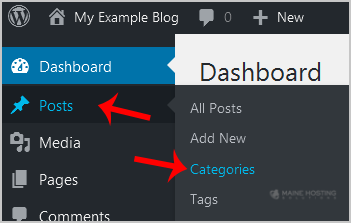
3. On the right side you can see a list of categories. Hover your mouse on a category you wish to remove and a few options will appear. Click on the "Delete" option. The confirmation option will appear. Click on "OK".
Nejpopulárnější
WordPress: How to add pages to the menu/navbar
You can edit the items in your main menu by going to Appearance > Menu in your dashboard:...
How to Reset a WordPress Password from phpMyAdmin
Do you want to reset your WordPress password using phpMyAdmin? If you are unable to reset your...
How to Retrieve your WordPress Login Password.
You can easily access and edit your WP Admin login via the MHS Client Portal Login to the MHS...
WordPress Video Tutorials
These are basic tutorials for managing a WordPress Website using the stock starter WordPress...
How to change your WordPress Admin Username
Using the steps below, I'll show you how easy it is to add a new WordPress administrator user,...